
The term SFM Compile has become a search phrase for people exploring digital animation, 3D models and Source Filmmaker projects. However, it does not always refer to one particular application, website or downloadable tool. Its meaning depends on the context in which it appears.
For animation creators, SFM Compile is commonly associated with preparing custom models and other assets so they can work inside Source Filmmaker. Some users also use the phrase when discussing the process of finishing an animation, exporting a video or putting several SFM clips together.
This difference matters because finding the right information depends on knowing what someone is trying to accomplish. A person importing a custom character needs a different workflow from someone who simply wants to export a finished animation.
This guide explores the meaning of SFM Compile, the technology behind it, the tools involved, the basic model-compilation process and the problems creators may encounter. It also looks at online resources and practical safety considerations for people searching for SFM-related downloads.
What Is SFM Compile?
SFM Compile is a term commonly associated with compiling custom models and assets for Source Filmmaker, Valve’s 3D movie-making software. In a technical workflow, compilation converts compatible source files and instructions into model files that the Source engine can load.
The process generally involves model source files, a QC instruction file and Valve’s StudioMDL compiler. Crowbar is another commonly used utility that provides a graphical interface for working with Source model compilation.
The phrase can also appear in discussions about rendering animations or creating collections of SFM videos. It is not the name of one universally recognised official Valve application.
Related Post: https://magazinetrend.co.uk/kaley-cuoco/
What Does SFM Stand For?
SFM stands for Source Filmmaker, a movie-making application developed by Valve. It allows creators to build animated scenes using characters, props, cameras, lighting and other assets from games that run on the Source engine.
Unlike a traditional video editor, Source Filmmaker gives users control over a virtual environment. They can position characters, adjust their movements, create camera shots, change lighting and arrange scenes before producing a finished movie.
Valve originally developed the software for its own filmmaking work. It was also used to create animated promotional films, including content associated with Team Fortress 2.
One important feature is its relationship with the Source engine. Assets designed for compatible Source games can be reused in filmmaking projects, while custom assets can be prepared for use in the same environment.
This flexibility makes SFM useful for different types of creative projects, including:
- Animated short films and storytelling.
- Character-based scenes and cinematic sequences.
- Gaming animations and machinima.
- Promotional videos and fan-made projects.
- Custom character and prop presentations.
- Lighting, camera and animation experiments.
Source Filmmaker is available through Steam as a free public beta. It is therefore important to distinguish the actual software from third-party websites that use similar names.
How SFM Compile Works Behind the Scenes
The technical side of SFM Compile becomes easier to follow when the different parts of the process are considered separately.
A custom 3D model cannot always be placed directly into Source Filmmaker in its original format. The model must be prepared in a format that the Source engine’s tools can process.
This is where model compilation comes into the workflow.
The creator starts with a model created or edited in compatible 3D software. The geometry, skeleton information and animation data are exported into supported intermediate formats. A QC file then tells the compiler how to assemble the model.
StudioMDL reads those instructions and creates the compiled model files.
The Main Components of Model Compilation
| Component | Purpose | Why It Matters |
| SMD or DMX | Stores model and animation data | Provides source information |
| QC file | Contains compilation instructions | Defines how the model is assembled |
| StudioMDL | Processes the QC instructions | Creates the compiled model |
| Crowbar | Provides a graphical interface | Makes the process easier to manage |
Each component performs a different job. The source files contain the information, the QC file provides instructions, and the compiler produces the engine-compatible output.
What Is a QC File?
A QC file is a plain-text instruction file used by the Source model-compilation system.
It tells the compiler important information about the model, including its output name, location, geometry files, materials and animation sequences.
A QC file can also contain instructions for collision models and other model properties.
For beginners, this is one of the most important parts of the process. A small spelling mistake, incorrect folder location or missing source file can prevent a model from compiling successfully.
What Does StudioMDL Do?
StudioMDL is the model compiler used by the original Source engine toolchain.
Its job is to read the QC instructions and process the referenced model data. When the required files are available and the instructions are valid, it produces compiled model files that compatible Source applications can use.
It is not a general-purpose 3D modelling application. It works as part of a larger asset-preparation process.
Why Does Crowbar Matter?
Crowbar is a community-developed utility used for working with Source engine models. It provides a graphical interface for tasks such as compiling and decompiling supported models.
Instead of relying entirely on command-line operations, creators can configure their game or application paths, select QC files and review compilation output through its interface.
It can make the process more approachable, particularly for people who are new to Source engine asset preparation.
Related Post: https://magazinetrend.co.uk/sabrina-carpenter/
Which Tools Are Used in an SFM Compile Workflow?
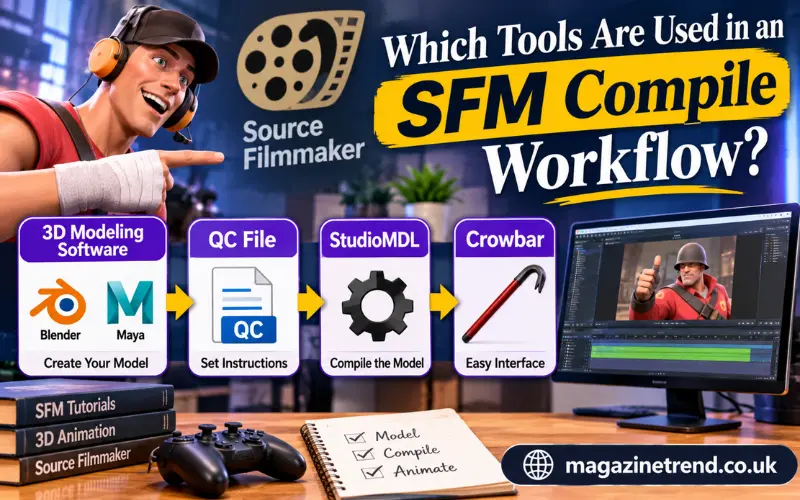
There is no requirement to use every available 3D application. The tools depend on the type of model being created and the creator’s existing workflow.
Some applications handle modelling, others prepare textures, and separate utilities perform compilation.
| Tool | Main Function | Typical User |
| Source Filmmaker | Creates animated scenes | Animators |
| Blender | Creates and edits 3D models | 3D artists |
| Crowbar | Compiles and decompiles Source models | Modders and creators |
| StudioMDL | Builds compatible Source models | Advanced users |
| VTFEdit | Works with Source texture formats | Asset creators |
Blender is useful for preparing custom geometry and working with model components. Crowbar helps manage the compilation stage, while StudioMDL performs the actual model-building operation.
Texture preparation is a separate consideration. Source materials commonly use VTF texture files and VMT material descriptions. A model may compile successfully but still appear incorrectly if its material paths or texture files are missing.
For this reason, checking the entire asset package is just as important as getting a successful compiler message.
How to Compile a Model for Source Filmmaker
The exact steps can differ depending on the model, export settings and tool versions. However, the general process follows a logical sequence.
Prepare Your 3D Model
Begin with a model created in Blender or another compatible 3D application.
Check its geometry, scale, orientation and overall structure. If the model includes a skeleton, make sure the bones and weight assignments are prepared correctly.
A model that looks good in a 3D editor may still need adjustments before it can work properly in Source Filmmaker.
Export the Required Files
Export the model into a supported intermediate format, such as SMD or DMX.
Depending on the project, you may need separate files for reference geometry, animation sequences and collision geometry.
Keep the exported files organised. Clear naming makes it easier to identify missing resources and correct file references later.
Create the QC File
Prepare a QC script that tells StudioMDL how to build the model.
The instructions should reference the correct geometry files, output location and relevant model settings.
Check the paths carefully. Even a small mismatch between the filename in the QC file and the actual exported file can interrupt compilation.
Configure the Compiler
Open Crowbar or configure the appropriate StudioMDL toolchain.
Select the correct Source Filmmaker game setup and check that the compiler points to the appropriate installation directory.
Do not assume that a configuration intended for another Source engine game will automatically work for SFM.
Start the Compilation Process
Select the QC file and run the compilation.
The compiler processes the source data and reports errors or warnings where necessary. Read the output instead of relying only on whether the process appears to finish.
If the compiler reports a missing file, incorrect path or unsupported instruction, correct the problem before continuing.
Check the Output Files
A successful model compile usually produces several related files.
| File Extension | General Purpose | Importance |
| .MDL | Main model information | Essential |
| .VVD | Vertex data | Essential |
| .VTX | Optimised rendering data | Essential |
| .PHY | Physics and collision information | Depends on the model |
| .ANI | Additional animation data | Depends on the model |
The exact output depends on the QC instructions and compiler configuration.
Keep the related output files together. Moving only the main MDL file while leaving its supporting files behind can cause loading problems.
Test the Model in SFM
Place the compiled asset in the appropriate model directory and load it into Source Filmmaker.
Check whether the model appears correctly, whether its textures are visible and whether its animations behave as expected.
Testing is essential because a successful compilation does not guarantee that every part of the model will work perfectly in an animation scene.
Common SFM Compile Problems and Their Solutions
Compilation errors are a normal part of working with custom assets. Even experienced creators may encounter problems when importing models from different applications.
The important thing is to identify the source of the problem rather than repeatedly running the compiler without making changes.
Missing Files or Incorrect Paths
One common problem occurs when the QC file references a source file that cannot be found.
This can happen after renaming files, moving folders or exporting a model into a different directory.
Possible solution: Check the filenames and directory paths in the QC script. Make sure every referenced file exists in the expected location.
Models Appear Without Textures
A model can compile correctly while displaying missing or incorrect materials inside SFM.
This usually points towards a texture or material-path issue rather than a problem with the geometry itself.
Possible solution: Check the VTF files, VMT descriptions and material directory references. Confirm that the texture names match the material definitions.
Incorrect Skeleton or Animation
A character may appear in the scene but have broken movements, incorrect bone positions or an unexpected pose.
These problems can originate in the original rig, exported animation data or mismatched skeleton structures.
Possible solution: Review the armature, bone names and weight assignments in the original 3D application. Re-export the relevant files and test the model again.
Compiler Warnings
Not every warning means the compilation has failed. Some warnings identify issues that may affect model quality, animation or compatibility.
However, ignoring every warning is not a good approach.
Possible solution: Read the complete compiler log, identify the warning’s cause and test the resulting model carefully.
Source Filmmaker Crashes
Crashes can occur for several reasons, including problematic assets, resource-heavy scenes or compatibility issues.
Possible solution: Save your project regularly, test newly added models separately and remove recently imported assets when investigating a crash.
Related Post: https://magazinetrend.co.uk/victor-davis-hanson-net-worth/
SFM Compile vs Rendering: What Is the Difference?
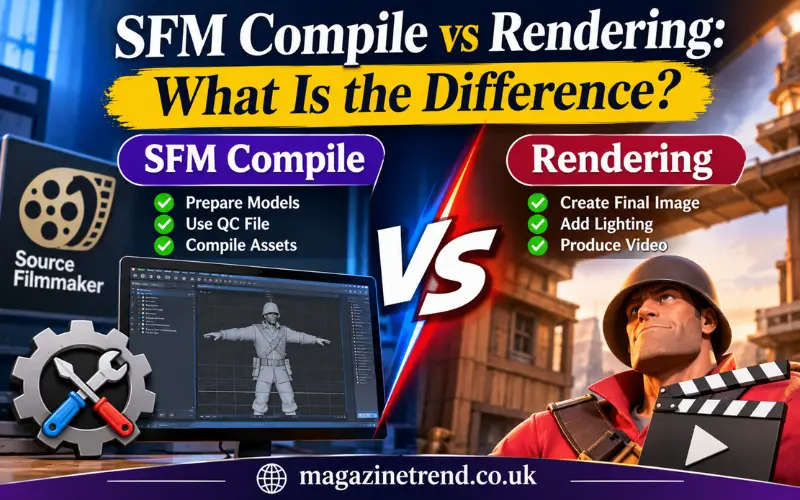
These terms are sometimes mixed together, especially in online tutorials and discussions.
However, compiling a custom model and rendering a finished animation are different tasks.
Model compilation prepares assets so the Source engine can load them. Rendering produces the final visual output of a scene.
For example, a creator might spend several hours preparing a custom character and compiling its model files. Once the character works inside SFM, the creator can animate it, arrange the lighting and export the completed sequence.
The two stages are connected, but they do not perform the same function.
| Feature | Model Compilation | Animation Rendering |
| Main purpose | Prepare compatible assets | Produce final visuals |
| Main inputs | Model files and QC scripts | Scenes, cameras and animation |
| Typical output | Compiled model files | Video or image sequence |
| Main focus | Asset compatibility | Visual presentation |
| When it happens | During asset preparation | During project output |
This distinction is particularly useful for beginners who search for an SFM compile tutorial but actually need help exporting their finished movie.
Is SFM Compile a Website or an Official Valve Tool?
Another source of confusion is the use of the phrase across websites, blogs and online communities.
Some websites use SFM Compile as a title, brand or subject category. Others publish tutorials about Source Filmmaker model preparation.
That does not mean every website using the phrase is connected to Valve.
The official Source Filmmaker product is distributed through Steam. Valve’s documentation and official SFM website provide information about the software and its use.
There is no reason to assume that an unfamiliar website offering an SFM Compile login, membership or download is an official Valve service.
Before using a third-party platform, check its ownership information, privacy policy, contact details and download sources.
A trustworthy resource should explain what it offers rather than relying on the SFM name alone.
Is SFM Compile Safe to Use?
The model-compilation process itself is a normal part of Source engine asset creation. However, the safety of a download depends on where it comes from.
Creators should be particularly careful when searching for unofficial software packages, executable files or websites claiming to provide special versions of SFM tools.
A few sensible precautions can reduce unnecessary risks:
- Download Source Filmmaker through its official Steam listing.
- Use recognised project sources for third-party utilities.
- Avoid unknown executable files advertised as essential SFM compilers.
- Do not share Steam account credentials with unrelated websites.
- Review permissions and privacy policies before creating accounts.
- Keep backups of important model files and animation projects.
- Scan unfamiliar downloads with reputable security software.
A website’s name or appearance does not establish that it is safe. Check the actual source before installing anything.
Who Should Learn About SFM Compile?
SFM Compile is particularly relevant to people who want more control over their animation assets.
For beginners, learning the basic process can make it easier to identify why a custom model is not appearing correctly. For experienced creators, understanding QC instructions and compiler output can help with more complicated asset projects.
It may be useful for:
3D Modellers: People who create custom characters, props and objects may need to prepare their assets for the Source engine.
Animation Creators: Anyone producing SFM movies can benefit from knowing how custom assets are prepared and loaded.
Game Modders: Modders working with compatible Source engine games may already be familiar with the model-compilation process.
Digital Artists: Artists interested in character design and cinematic presentations can use the workflow to bring their creations into an SFM environment.
Learning the process is not necessary for every SFM user. Someone working exclusively with existing models and assets may be able to create complete animations without compiling anything themselves.
The Future of Source Filmmaker and Custom Asset Creation
Source Filmmaker remains an important part of the history of game-based animation. Its ability to reuse game assets in cinematic projects helped make it accessible to a wide range of creators.
At the same time, modern 3D production tools offer different approaches to modelling, animation and rendering.
This means creators should pay attention to the software and engine version they are using. Tools designed for the original Source engine are not automatically compatible with Source 2 workflows.
The same principle applies to tutorials. An older guide may still be useful, but its file paths, software versions or setup instructions may need checking before following it today.
For anyone beginning an SFM project, the most practical approach is to learn the original workflow first, keep source files organised and test assets before using them in larger scenes.
FAQs
What is SFM Compile?
SFM Compile commonly refers to preparing and converting custom models into formats that Source Filmmaker can use. It generally involves source model files, a QC script and the StudioMDL compiler.
Is SFM Compile an official Valve application?
No single standalone application officially named SFM Compile is established by Valve. Source Filmmaker is Valve’s filmmaking software, while model compilation uses the associated Source engine tools.
Is Source Filmmaker free?
Yes. Valve makes Source Filmmaker available through Steam as a free public beta. A Steam account is required to access the software.
What is the purpose of a QC file in SFM?
A QC file provides instructions to the model compiler. It specifies information such as model names, source geometry, material paths and animation sequences.
Can Blender models be used in Source Filmmaker?
Yes, custom models can be prepared in Blender and exported through a compatible workflow. The model data must be converted into formats supported by the Source engine before it can be loaded correctly.
Why does an SFM model sometimes appear without textures?
This can happen when texture files are missing, material paths are incorrect or VMT and VTF references do not match. Checking the material directory and texture definitions is a useful first step.
Conclusion
SFM Compile is best viewed as a search term connected to the technical and creative processes surrounding Source Filmmaker. Its most useful technical meaning involves preparing custom 3D models for the Source engine through source files, QC instructions and StudioMDL.
However, it is not the same as rendering a finished animation, and it should not automatically be treated as the name of an official Valve website or standalone application.
Once creators recognise the difference between asset preparation, model compilation and final video production, the entire workflow becomes easier to follow. Careful file organisation, correct compiler settings and reliable download sources can also prevent many avoidable problems.
For beginners and experienced digital artists alike, learning these fundamentals provides a more reliable starting point for creating custom content with Source Filmmaker.
